
Case Summary
My Role
I defined AI opportunity spaces, established experience principles and design language for AI surfaces, and led cross-functional alignment across PM, Engineering, Data Science, and Customer Success. I also built the measurement framework that tracked AI-assisted task completion.
Problem I Was Solving
Enterprise customers had outgrown Account Hub’s limited feature set. Bulk operations required spreadsheet exports, manual edits, and error-prone re-imports, pushing administrators off the platform and onto the phone with support.
Challenges
It wasn’t a features problem, it was a confidence problem. Admins didn’t trust the platform to do what they expected, so they stopped using it. Reframing around clarity, control, and reversibility unlocked the right design direction.
Outcomes
12% lift in self-service task completion. Measurable drop in support contact volume. Admins stopped working around the platform and started trusting it.
Context and Challenge
A self-service platform operating above its design ceiling
Account Hub was built for a single user managing a handful of lines – but enterprise customers managing hundreds or thousands of lines across departments, cost centers, and geographies had long outgrown that model. Bulk operations existed but required exporting data to spreadsheets, manipulating them externally, and re-importing – a fragile process prone to version risk and upload failures, with no way to preview impact before committing changes at scale. The result was hours lost to tasks that should take minutes, errors compounding across large datasets with little ability to recover, and a trust gap that pushed administrators off the platform entirely – calling support rather than risking a mistake that could affect hundreds of users at once.
This is a confidence and scale problem. The platform doesn’t give enterprise administrators the clarity, control, or efficiency they need to act decisively. The result is a tool that is technically capable but practically unusable at the scale its most valuable customers actually operate.
Research Approach
The User Research team provided support through existing customer findings and synthesis as well as conducting new research:
- Shadowed enterprise account manager workflows across three customer segments
- Mapped task frequency against cognitive load to identify highest-friction jobs
- Interviewed IT admins, account managers, finance leads, and procurement roles
- Documented platform abandonment patterns and support escalation triggers
What we found
Three consistent failure patterns across every customer segment
Bulk operations via spreadsheet
Bulk changes required exporting data, manipulating external spreadsheets, re-importing, and resolving errors through a separate process, a fragile handoff that introduced lag, version risk, and frequent upload failures on large datasets.
Opaque account structure
Limited visibility into how lines were organized across departments, cost centers, or usage tiers, making it impossible to make targeted decisions without first doing significant manual analysis.
No change preview
Administrators had to commit changes to see their effect. There was no way to model what a plan change would cost or who it would impact before executing, so many chose not to act at all.
Platform abandonment → support call
When tasks became too complex or too risky to complete in-platform, administrators called support instead – offloading work that should’ve been self-serviceable, at real operational cost to both sides.
Not a capability problem. A confidence problem.
Early synthesis kept gravitating toward feature solutions, better filters, more data tables, improved search. The reframe came from a pattern in the research: administrators weren’t abandoning the platform because they couldn’t find functionality. They were abandoning it because they didn’t trust that what they were doing would produce the result they expected.
Reframing the problem around clarity, control, and reversibility at scale unlocked an entirely different design direction — and made the role of AI specific. The question shifted from “where can we add AI?” to “which jobs are users failing at because they lack confidence, and what AI capability would restore it?”
The platform doesn’t need more features. It needs to help administrators understand what will happen before they commit and make it easy to course-correct if something goes wrong.
AI Intervention Model and Jobs to be Done
Before deciding where to introduce AI, start with the job
We mapped every high-friction job against three AI intervention levels. The level isn’t determined by what’s technically possible – it’s determined by error cost, data confidence, and how much trust the user has built with AI in lower-stakes contexts.
Level 1
Make it easier
AI reduces friction, user stays in control
The user is still doing the job. AI removes steps, surfaces context, pre-fills fields – but the human acts at every decision point. The right entry level for high-accountability tasks where trust must be earned before going deeper.
User control:
AI depth:
Trust required:
Full
Low
Low
Example:
Account Hub: Intent-aware search – “lines over data limit in Seattle Office” returns a filtered result set with action options in Line Management UI, not a keyword match. User still reviews and acts; AI removed the manual overhead.
Level 2
Show me
AI guides the decision with visible reasoning and/or instruction
AI surfaces a recommended path with reasoning shown – the user decides whether to follow it. The trust-building middle ground: AI takes on analytical work the user would otherwise do manually, but the human confirms before anything executes.
User control:
AI depth:
Trust required:
Shared
Medium
Medium
Example:
Account Hub: Impact preview before bulk commit of plan changes – projected cost delta, affected lines, edge cases flagged. Admin reviews and approves in Plan Administration UI. This pattern drove the largest share of the 12% lift in self-service completion.
Level 3
Do it for me
AI execute, with confirmation gates and decision trees
AI takes the action. Appropriate only where data confidence is high, errors are recoverable, and users have built trust through levels 1 and 2. Rushing here without that foundation is the most common failure modality in enterprise AI adoption.
User control:
AI depth:
Trust required:
Delegated
High
High
Example:
Account Hub – Reports & Analytics: AI learns which reports each administrator runs, when they run them, and who receives them. Based on those patterns, it proposes a schedule, generates the reports automatically, and delivers them to the right stakeholders – with a review window before anything goes out.
Jobs mapped to intervention levels
Here’s an example of a simple structure we used to map out jobs-to-be-done to AI intervention levels. This helped us create a conversation artifact – when having cross-functional meetings, we used this to drive attention to design decisions in order to have real discussions about feasibility. Could we do what we wanted to do?
| Job to be done | Role | Intervention | AI implementation |
|---|---|---|---|
| Find accounts matching a complex condition | Acct. manager | Make it easier | Intent-aware natural language search |
| Understand which lines need attention before renewal | Acct. manager | Make it easier | Proactive account health surface |
| Know the impact of a plan change before committing | Acct. manager | Show me | AI impact preview – cost delta, edge cases |
| Identify the right plan for a growing department | Finance lead | Show me | AI plan recommendation with cost/benefit summary |
| Apply a SOC/policy change across a department | Acct. manager | Show me | Bulk change with AI selection + review gate |
| Resolve a billing anomaly without calling support | Acct. manager | Show me | Conversational entry + guided resolution path |
| Keep plans optimized without manual review | Acct. manager | Show me | Scheduled AI optimization with 48-hr review window |
| Generate usage reports | Acct. manager | Do it for me | AI scheduled and generated reports with action items flagged |
| Bulk SIM swaps/changes | Acct. manager | Do it for me | AI formatting of bulk content for a reduction of errors and conditional decision making |
Moving towards design
The next challenge was going from strategy to design. At this stage, we’ve discovered areas of opportunity – core tasks in Account Hub where friction was high, and understanding was low resulting in frequent support center interventions.
We knew we had to keep our experience as simple as possible, so that by implementing new AI-enabled features, we weren’t introducing more cognitive load by further complicating the UI and presentation layers.
AI Experience Patterns
Defining AI experience patterns upfront – before any feature gets built – gives both development teams and end users a shared foundation to build on. Rather than solving the same design problems repeatedly or leaving users to guess how AI will behave, patterns establish a consistent language for how AI shows up across a product.
Benefits of aligning on AI experience patterns:
- Development teams build once and reuse, reducing design and engineering overhead across features
- Easily integrate into T-Mobile’s Design System, Arrow
- QA and testing become more predictable because expected behavior is defined before code is written
- Enterprise users develop a reliable mental model – they know what AI will do, how to override it, and what to expect next
- Consistency across surfaces builds trust incrementally, which is the precondition for users accepting deeper AI involvement over time
- Pattern alignment keeps cross-functional teams – design, engineering, product, data science – working from the same playbook, reducing friction at handoffs
Pattern 01
AI-Assisted Search & Discovery
Transforms keyword search into intent-aware retrieval – understanding what enterprise users are actually trying to accomplish, not just matching strings.
Do
- Show intent interpretation above results
- Surface related context users didn’t search for
- Let users refine with natural language
- Explain why results were ranked (confidence/relevence)
Don’t
- Auto-execute actions from search results
- Hide confidence thresholds
- Bury zero-state guidance
- Replace existing navigation patterns
T-Mobile application: Account Hub search evolved from lookup-by-account-number to intent-aware queries like “show me accounts at risk of overages” – surfacing predictive signals alongside results.
Pattern 02
Task Management & Automation
AI reduces repetitive cognitive load by pre-filling, sequencing, and automating enterprise workflows – while keeping humans in control of consequential actions.
Do
- Pre-fill with suggested values, not locked values
- Show what was automated and why
- Require explicit confirmation for high-stakes tasks
- Allow bulk actions with review gates
Don’t
- Auto-complete without a review step
- Use jargon in AI-generated suggestions
- Ignore role-based permission context
- Chain automations without clear audit trails
T-Mobile application: Account Hub’s self-service task flows used AI to pre-populate plan changes based on usage data – surfacing suggested action cards that account managers could approve or modify before going deeper into the self-service Plans workflow.
Pattern 03
Conversational UI / Chat
Enables natural language interaction as an entry point – much like T-Life’s consumer chat feature – but enterprise chat must handle multi-step queries, role-aware responses, and handoff to structured UI within core workflows.
Do
- Show structured UI after natural language entry
- Remember context within a session
- Offer starter prompts for enterprise use cases
- Design for pre-support scenarios
Don’t
- Use chat as the only interaction mode
- Ignore the hallucination risk for factual data
- Make every action require conversation
- Design for single-turn only
T-Mobile application: A conversational assistant layer was proposed for Account Hub to help enterprise admins query billing anomalies and plan usage with plain language – bridging into structured forms for resolution.
Pattern 04
Proactive Suggestions & Recommendations
AI surfaces insights and actions before users have to look for them – turning passive dashboards into active guidance systems for enterprise decision makers.
Do
- Prioritize by urgency and user role
- Make recommendations dismissible and learnable
- Show the signal behind each recommendation
- Limit to 3–5 actionable items at once
Don’t
- Flood users with low-confidence nudges
- Design recommendations that feel like ads
- Ignore feedback loops for accuracy tuning
- Surface suggestions without a clear action
T-Mobile application: A recommendation surface was designed for enterprise account health – flagging usage thresholds, contract renewal windows, and plan optimization opportunities for account managers.
Building and testing AI-enabled Bulk Transactions
At this stage, we’ve created a solid foundation on how to bring AI into the T-Mobile for Business Account Hub:
- Understood and agreed upon root problems to solve for our customers and support staff based on user research and analytical data
- Agreed that more features won’t solve for fundamental challenges that exist within core workflows
- Narrowed our AI implantation approach by modeling AI intervention against jobs to be done
- Assessed and decided on action priority based on overall workflow friction reduction, most-used features and technical capabilities
- Agreed upon how, when and where AI would be designed into the presentation layer and UI
Focusing on reducing friction for Bulk Transactions
Account Hub allowed users to manage, add, port-in and suspend lines 5 at time – which accounted for roughly 6% of all manage lines transactions on the platform.
Most users struggled through the bulk workflows, often requiring lengthy and manual data input resulting in sometimes endless error loops and the abandonment of the tasks all together.
We saw an opportunity to:
- Reduce friction navigating to specific bulk actions
- Address account selection confusion (most orgs had multiple accounts)
- Reduce friction within bulk workflows by allowing for in-app data entry and real-time validation
- Communicate plan and cost changes upfront before order submission
- Suggest actions to complete tasks like adding or porting in lines, where use cases may require additional devices or upgrades
Existing bulk action workflow:
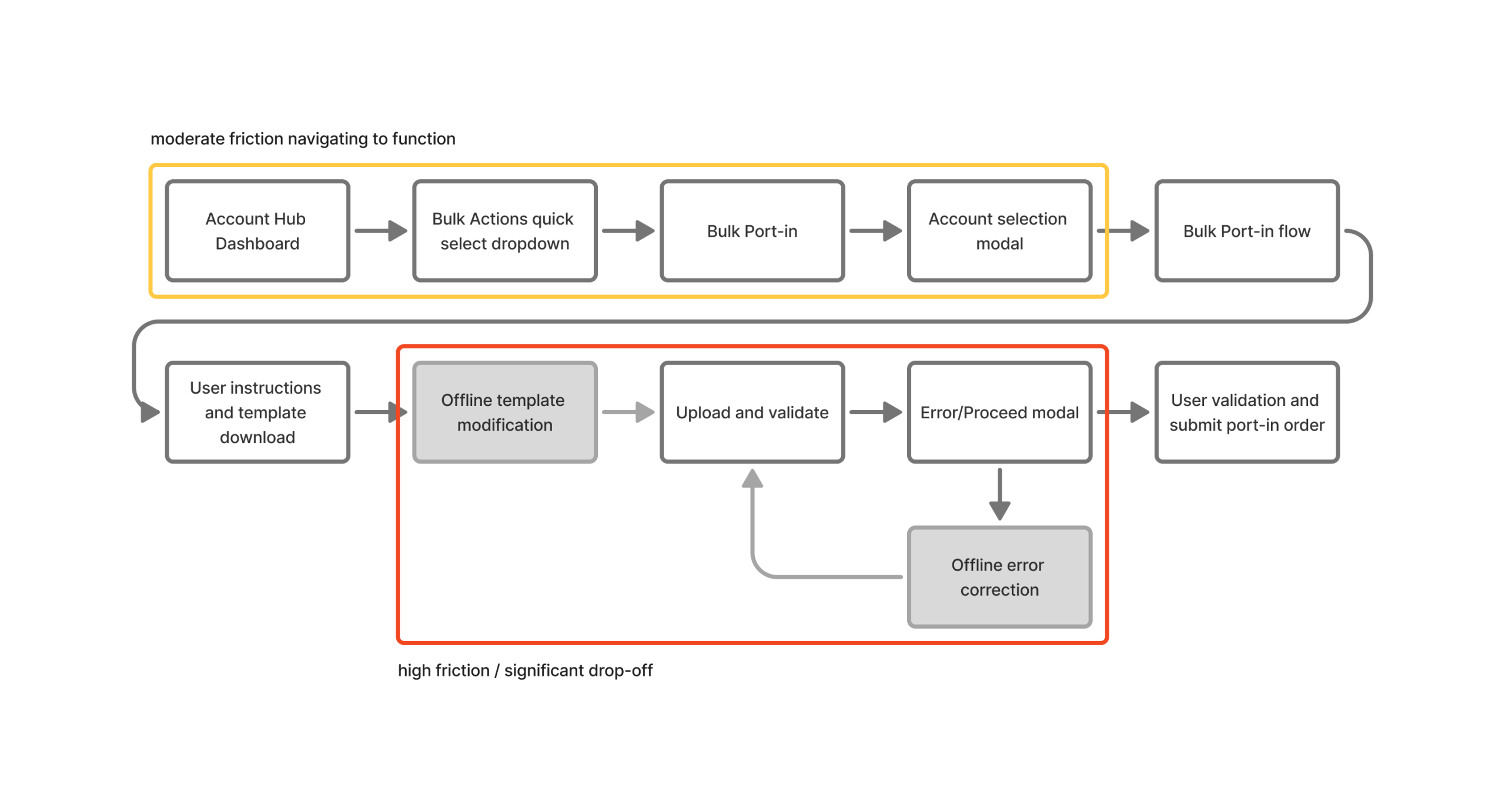
Users had issues in understanding that before any actions could be taken on ANY line management feature, an account must be selected. Which was presented to the user as an interstitial modal asking the user to select which account changes would be made.
Additionally, users found the bulk workflow to be time consuming, confusing and just painful – often resulting in bailing out and calling support to assist.
Updated and optimized bulk action workflow:
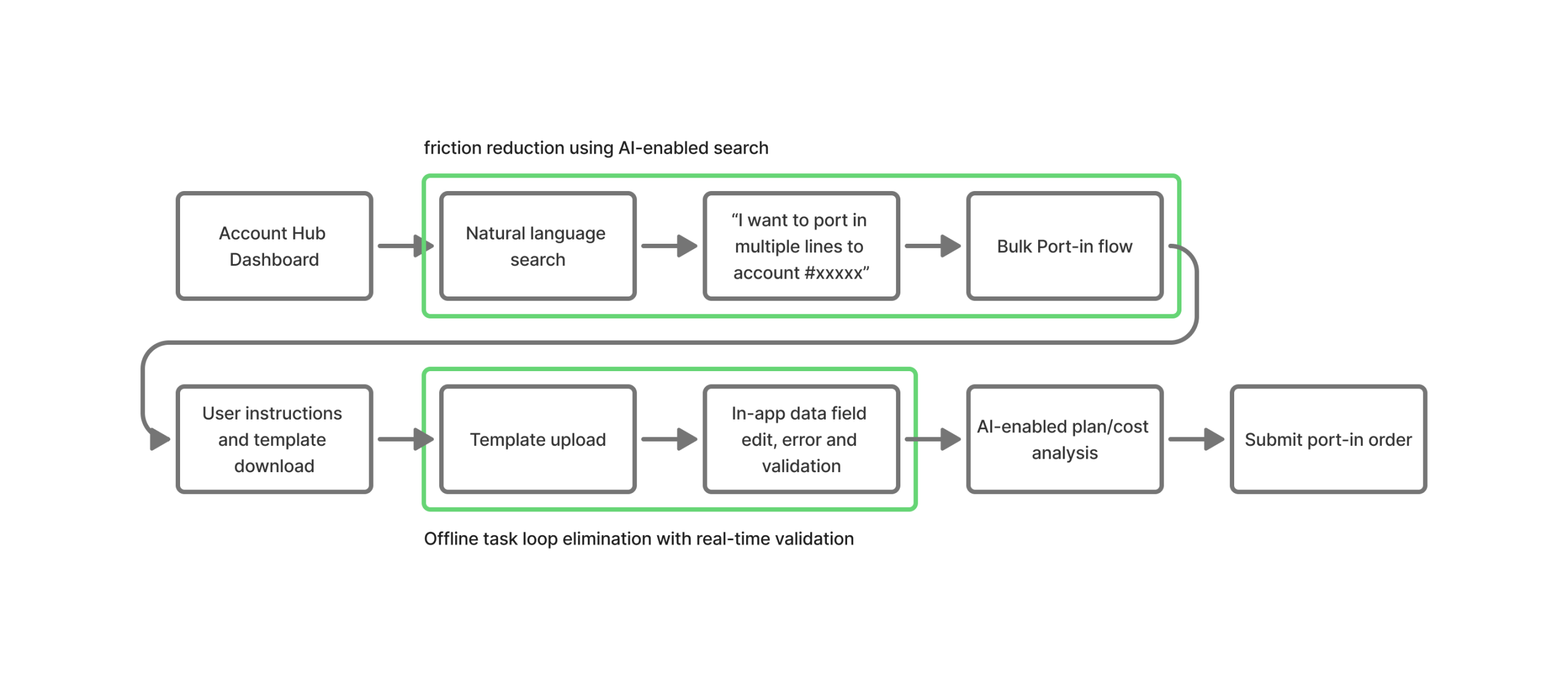
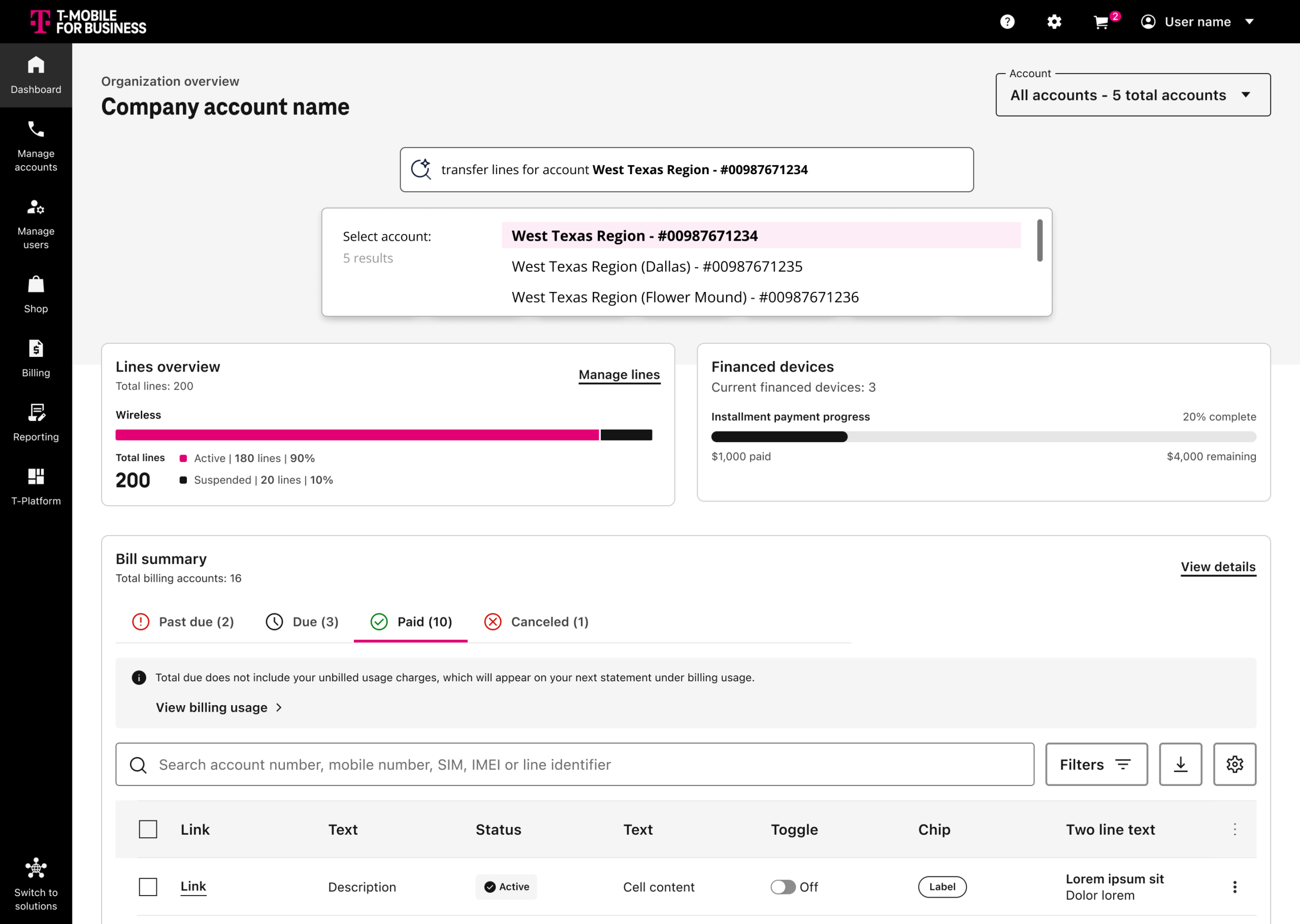
Taking a conservative approach was the way to go here. Design, product and engineering aligned on implementing a lighter AI solution to solve for better handling of bulk action entry. Utilizing natural language search allowed for users to bypass account selection through an explicit prompt – or – auto completion/select from in the search field in cases where a user may only know the name of the account or a partial account number.
AI takes a back seat during the bulk workflow, but we removed the external data entry and modification on errors by designing and including a built in spreadsheet editor allowing for the copying and pasting of up to 50 lines at a time, or the upload of an unformatted CSV, where the system would auto format and allow for in-app modification and quick error resolving.
These examples are shown below.
Outcomes
AI doesn’t have to go all-in
Early in the process, discussing AI in a vacuum, without talking about problems to solve or value to bring – it felt REALLY big. It distracted us from being able to break things down, and see opportunities in a smaller, yet highly strategic approach.
Having a more comprehensive guide and framework allowed us to have meaningful discussions about what we SHOULD do. Aligning to things like the intervention model, and breaking things down by jobs to be done allowed for smaller, more measurable iterations that would chip away at bigger experience issues.
Trust is built layer by layer
Starting at “make it easier” wasn’t a concession, it was a strategy. Each shipped pattern de-risked the next. Users who experienced AI being right at level 1 were significantly more willing to accept AI guidance at level 2. The adoption data from shipped features became the gate for deeper automation work and investment from our leadership teams.
The result
12% self-service completion lift
The primary success metric was self-service task completion rate: tasks completed in-platform with AI assistance, without requiring a support escalation. AI-assisted flows delivered a +12% increase, with a corresponding reduction in support contact volume.
The more meaningful signal was qualitative. Administrators stopped describing the platform as something they had to work around when it came to bulk actions.
